

If your to-do list keeps growing while your days disappear into email, meetings and interruptions, time blocking can help. Instead of working from a list and hoping, you give every important task its own slot on your calendar.
This guide explains what time blocking is, how it differs from timeboxing, how to set up your first time-blocked day in six steps, and the tips and mistakes that decide whether it sticks.
In this guide
What is time blocking?
Time blocking is a time management method where you divide your day into blocks and assign each block to a specific task or type of work. A to-do list tells you what to do; a time-blocked calendar also tells you when you’ll do it.
A typical time-blocked day includes:
- Deep work blocks for focused, important tasks
- Shallow work blocks for email, messages and admin
- Meetings and calls
- Buffers and breaks between blocks
- A short planning block at the start or end of the day
Why time blocking works
- Less task switching. The American Psychological Association notes that even brief mental blocks from shifting between tasks can cost up to 40% of productive time. Time blocking groups similar work so you switch less.
- Fewer decisions. You decide what to work on once, during planning, not every hour.
- Realistic plans. When tasks must fit into real hours, you quickly see whether your list is possible.
- Protected priorities. Your most important work gets a slot before other people fill your calendar.
- Better time estimates. Comparing planned blocks with what actually happened teaches you how long tasks really take.
Time blocking vs timeboxing
The two terms are often used interchangeably, but there’s a useful difference. Time blocking reserves time for a task or type of work. Timeboxing sets a fixed limit for a task with a clear outcome, and you stop when the time is up.
| Time blocking | Timeboxing | |
|---|---|---|
| Main goal | Reserve time for tasks | Limit time and finish an outcome |
| What you plan | When you’ll work on something | How long and what result |
| When the time ends | Move to the next block | Stop, even if not perfect |
| Best for | Structuring the whole day | Beating procrastination and perfectionism |
In practice, the best approach combines them: block your calendar for the day, then treat the most important blocks as timeboxes with a specific outcome, such as “write the first draft of the report” rather than “work on report.”

How to time block your day in 6 steps
1. Brain dump and prioritize your tasks
List everything on your mind: work tasks, calls, errands and personal to-dos. Then decide what matters most. The ABCDE method is a quick way to rank tasks by consequence, so the most important ones get the best time slots.
2. Break big tasks into specific outcomes
Don’t block “Finish presentation.” Break it into outcomes you can finish in one block: “Draft outline (30 min),” “Design 3 slides (45 min),” “Review and polish (30 min).” Clear outcomes tell you when a block is done.
3. Estimate time, then add a cushion
Most tasks take longer than we expect. Estimate each task, then add about 25%. If you don’t know how long something takes, track it for a week and use the real numbers.
4. Schedule your blocks
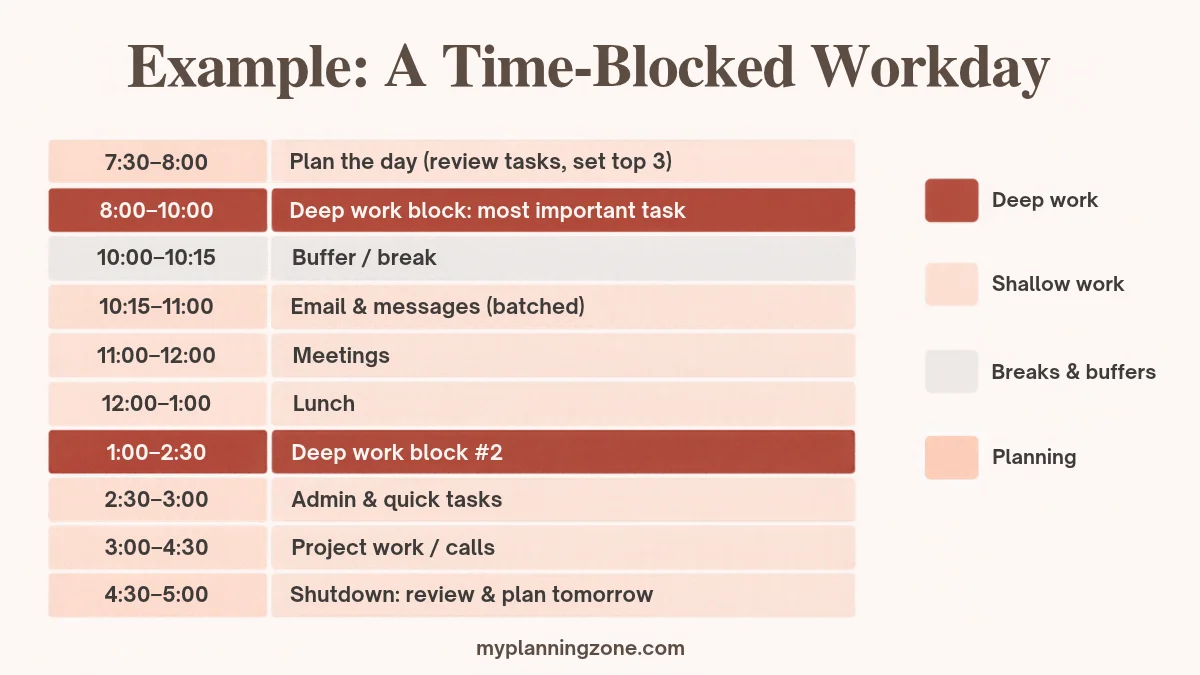
Put your most demanding work where your energy is highest, often in the morning. Then add meetings, batch shallow tasks (email, messages, admin) into one or two blocks, and leave 10 to 15 minute buffers between blocks.
5. Use a timer and protect your blocks
Start each focus block with a timer, close unrelated tabs and silence notifications. Treat focus blocks like appointments: if someone asks for that time, offer a different slot. If you like short sprints, the Pomodoro Technique fits neatly inside a longer block.
6. Adjust during the day and review at the end
Plans will break. When a task runs over or something urgent appears, don’t abandon the schedule: move the remaining blocks. Spend five minutes at the end of the day reviewing what happened and blocking tomorrow.
Time blocking examples
For an office or remote worker: plan (15 min), deep work (2 hours), buffer, batched email (45 min), meetings, lunch, second deep work block (90 min), admin (30 min), shutdown and planning (30 min).
For a student: review notes (30 min), lecture or class, study block for the hardest subject (90 min), break, assignment block (60 min), reading (45 min), next-day planning (10 min).
For a busy parent: morning routine, school run, focused work or errands block (2 hours), household batch (laundry, meal prep, 45 min), kids’ activities, family time, 10-minute evening reset and plan for tomorrow.
Want a ready-made layout? Our Time Blocking Templates give you printable daily and weekly pages to plan your blocks by hand.
10 time blocking tips that make it stick
- Plan the night before so you start the day knowing exactly what comes first.
- Protect one deep work block every day, even if it’s only 60 minutes.
- Batch similar tasks like email, calls and errands.
- Leave buffers of 10 to 15 minutes between blocks.
- Keep 20% of the day unscheduled for surprises.
- Color-code your calendar (for example deep work, meetings, personal).
- Block personal time too: exercise, meals and family time.
- Say no, or “not now”, to requests that would break a focus block.
- Review weekly and adjust estimates based on what really happened.
- Plan the whole week on Sunday with a quick weekly planning routine, then refine each day.
Common time blocking mistakes
- Overpacking the day. Back-to-back blocks with no breaks collapse by lunchtime.
- Vague blocks. “Work on project” invites procrastination; name the outcome.
- No buffer time. One overrun shouldn’t wreck the rest of the day.
- Quitting after one bad day. Adjust the plan instead of abandoning the method.
- Ignoring energy levels. Don’t schedule hard thinking for your slowest hour.

Time blocking is one of several techniques that work well together. See our full list of time management tips for the others.
Tools for time blocking
- Digital calendars such as Google Calendar or Outlook, with color-coded event types
- Timers on your phone or a simple kitchen timer for focus blocks
- Task managers to hold your brain dump and priorities
- Paper planners with an hourly layout, if you think better on paper
Whichever tool you use, the method matters more than the app. For more ideas, see our productivity hacks and our guide to improving your focus.
Frequently asked questions
What is the difference between time blocking and timeboxing?
Time blocking reserves a slot on your calendar for a task or type of work. Timeboxing sets a fixed time limit for a task with a specific outcome, and you stop when the time runs out. Many people combine the two: they time block the day and timebox their most important blocks.
How long should a time block be?
Most people work well with 60 to 90 minute blocks for deep work and 15 to 45 minute blocks for email, admin and small tasks. Add 10 to 15 minute buffers between blocks.
What should I do when something interrupts my time block?
Handle the interruption only if it is truly urgent, then move the rest of your blocks instead of abandoning the plan. If interruptions happen every day, add a dedicated block for them.
Is time blocking good for people with unpredictable schedules?
Yes, if you keep it flexible. Block only your most important task and leave larger buffers, or block your day in two or three broad chunks (focus, reactive work, personal) rather than every hour.
Should I time block on paper or in a digital calendar?
Either works. Digital calendars are easy to move and share, while paper planners help you think through the day and stay off your phone. Choose the one you will actually check during the day.
Start with one block tomorrow
You don’t need to block every minute right away. Tonight, choose your most important task for tomorrow, give it a 60 to 90 minute block in the morning, and protect it. Once that feels natural, add blocks for email, meetings and personal time.